For those of you using some of the default Ubuntu themes (Human, Tango or Industrial) there is a package that will match those same themes for your Firefox browser for a more consistent overall look. I’ve got a screenshot below and how to install. Lets get started!
To install these themes you will want to install the following package via command line or your favorite package management tool:
sudo aptitude install firefox-themes-ubuntu
After the quick installation you’ll need te restart firefox for any changes to take effect. Afterwhich you’ll see be presented with options such as these within your Tools > Addons > Themes menu.
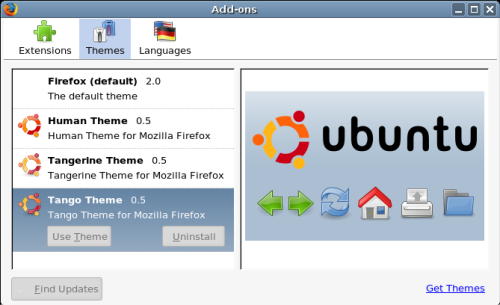
Adding this package is a really easy way to get your browser to match the same look and feel of your desktop. Of course there are many more themes available via the mozilla themes website, but this package is ubuntu specific to match the ubuntu default themes.
I have used the Tango and Industrial theme for quite some time. Not too shiny–nothing fancy, but a nice change from the brown / orange default.
That actually raises a question for me. I think one of the number one complaints that I hear about is the default brown desktop. Is it just me and my area or does it seem to be the same across the board? If it isn’t popular why is it still there on the sixth release?
I Love brown/orange…go away! It’s just that you never hear about us because we are content, unlike the brown/orange haters who complain about it 24/7. It takes like errr 5 seconds to change it?
If I look at the screenshot posted, I could not tell in which distribution you made it. If it still had the human decorations then it would be instant recognition…oh it’s Ubuntu (or any of it’s flavours)
I think that’s a better argument than “so-many-people-is-complaining”.
Other than that, good tip. Already had most of these themes from the Firefox themes pages myself.
EDIT: Don’t you just hate if you put a smaller than character in your message and your whole msg disappears. See: above.
Or you could just spare yourself all of this application-specific theming and use a browser that was built for gnome: Epiphany! It will automatically use whatever theme you choose for your desktop. I’d take epiphany over firefox any day.
Sorry to bother you, I appreciated your tip on the firefox icons , they’re really great, but seeing this post reminded me about one minor problem. Do you know some way to make firefox “see” the gnome proxy settings ? 😛
Epiphany is a nice idea, but it’s still very “green” in some areas, for example cookie management and they *REALLY* should add firefox extension support. I know that those things aren’t probably in the Gnome Team list and that Epiphany is great for some people but they’re things most power users care about, and lets face it, they’re probably 90% of linux users.
Well, I kind of agree with you on the brown theme. But it just looks like people like to complain, just read what people are thinking about the KDE default theme… yes, many dont like it. My point is; if Ubuntu had a different main theme, some would complain about that to.
Personally I dont care, cus it is so easy to change! People should try to change the look on Windows – without extra software that cost you, it is not easy. And even using extra software, its risky.
Pingback: Free Ubuntu Themes for Firefox- Don’t Be Evil at Opinions From My Space
I, for one, am sick to death of the white-blue-black of GUI themes — Windows XP is like that (thus I turn it off right away and give it my colours), OS X is like that, a lot of themes available for WindowBlinds are like that (or just horribly tasteless and eye-wrecking)… so yeah, I’m glad we here at Ubuntu are a bit different.
And if people don’t like it, they should change it to their taste — if anything, that’s why I like being able to set my colours in KDE (as do I like it in Windows).
The first Ubuntu “cycle” (Warty to Dapper) was going to remain on the same theme, and then with the new beginning (Edgy) the opportunity was there to change themes. I think this fell through with the artwork fiasco.
I imagine it’ll be another LTS (8.04 or 8.10) before we see a dramatic change in color schemes.
My personal choice is green, which fits with the current earthy feel. But that’s just me.
Want to render webpages with the gecko rendering engine and have icons that use the system theme (hopefully you already changed that to Tango)
sudo apt-get install epiphany-browser
It is just you. Many people like the brown/orange theme. Many people dislike it, but the dislike is not universal.
Personally, I’m tired of the blue colours seen in other OSes.
i kinda like the brown theme. unique theme for a unique distro! not that i use it 🙂 i dont use any theme for more than a month or so…
The package installed yet choices failed to appear. I was able to add the Human Theme from the Mozilla Add-on site.
jcwinnie – have you restarted your browser after installation? That is odd that you don’t see them.
see http://doted.info
Pingback: Automatically install Ubuntu themes to your Firefox « jao
Pingback: Ubuntu Themes for Firefox at Run As Never Get, Wander as Never. COMe
Hey!
Heres a great theme I discovered on Gnome-look which gives you the vista glass effect over Gnome.
The configuration steps for Ubuntu are here:
http://abhishek-myspace.blogspot.com/2007/07/make-ubuntu-look-like-vista.html
Pingback: links for 2007-07-29 « membo