Yesterday I wrote about some of the options inside Text Editor that you might not know about. Today I wanted to outline just a few more things that can take this editor to the next level. Plugins.
Who would have thought that a text editor–a basic text editor–would need something like plugins? Well I guess the gedit devs did and from the default list of plugins that I see these can add quite a bit of functionality to your editor.
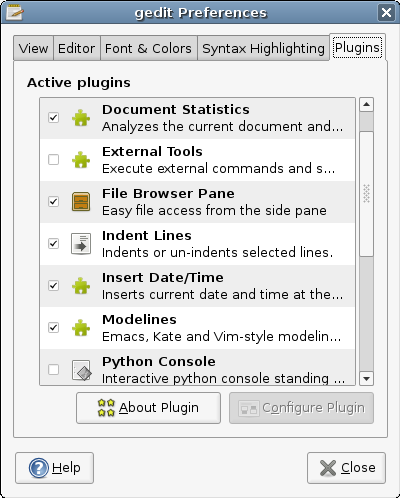
Here is a list of the plugins that should be available:
- Change Case : Changes the case of selected text.
- Document Statistics : Analyzes the current document and reports the number of words, lines, characters and non-space characters in it.
- External Tools : Execute external commands and shell scripts.
- File Browser Pane : Easy file access from the side pane
- Indent Lines : Indents or un-indents selected lines.
- Insert Date / Time : Inserts current date and time at the cursor position.
- Modelines : Emacs, Kate and Vim-style modelines support for gedit.
- Python Console : Interactive python console standing in the bottom panel
- Snippets : Insert often used pieces of text in a fast way
- Sort : Sorts a document or selected text.
- Spell Checker : Checks the spelling of the current document.
- Tag List : Provides a method to easily insert into a document commonly used tags/strings without having to type them.
- Text Encryption : *This plugin performs encryption operations on text.
- User Name : Inserts the user name at the cursor position.
I think this is a pretty expansive list of features for a text editor and it should offer you just about everything you need. I use the Spell Checker, Document Statistics and Text Encryption quite a bit. I’m sure there is functionality for quite a bit more that I simply haven’t mastered yet.
* Text Encryption is only enabled if you have created a personal GPG key and have installed GPA or related.
There is a list of all plugins on the gnome wiki. http://live.gnome.org/Gedit/Plugins
Especially check out the 3rd party plugins, which add a lot of great features. Classbroweser, project management, latex etc.
OMG. Gedit is awesome, that file browser pane rocks. A bit like Textmate. I didn’t know that earlier, thanks!
How come I don’t have the file browser pane available in the plug-in list?
Pingback: Plugins para Gedit « EsUbuntu.org
It’s awesome, but I can’t install any extra plug-in. How do I install extra plug-ins? :-\
That’s fine and all. But there are further gedit plugins available which I just fail to install, because there is no .gnome2/gedit/ directory in ubuntu.
@Mohammed
The directory is likely hidden.
All directories which name start with a dot (like .gnome2) are hidden.
In Nautilus, in the menu View, select show hidden files -or- alternatively click on the button next to the crumble-bar (that displays the path). It then turns into a text-field; enter any path to go there.
If the gedit or gedit/plugins directory does not exist, just create it.
Hi,
I have the same problem as the previous post but Ubuntu will not allow me to mkdir gedit because a file called gedit exists.
How do we install a plugin to ~/.gnome2/gedit if the directory doesn’t exist and we can not create the directory? Shouldn’t it be there if it is where gedit looks for plugins?
Is it supposed to be somewhere in user/share or someplace else instead?
Thanks
OK I was able to install the symbol-browser plugin here http://www.micahcarrick.com/11-14-2007/gedit-symbol-browser-plugin.html#2
by unpacking it to /usr/lib/gedit-2/plugins.
I know that’s a system wide installation but it’s installed and working.
I had to take the two files out of the /usr/lib/gedit-2/plugins/plugins directory and put them into the main plugins directory and it worked.
I’d still like to know if there is a solution to the missing ~/.gnome2/gedit directory for installing to home directory. If anyone has the solution please post it.
Thanks
For anyone else having trouble getting plugins to work, remember to set the permissions of the python scripts to executable ie chmod 755 *.py
I could not install the HTML-Tidy plugin by copying it (incl chmod) to /usr/lib/gedit-2/plugins und Ubuntu 8.04. It just crashed.
But I sucessfully installed HTML-Tidy plugin like this:
sudo mkdir ~.gnome2/gedit/plugins
sudo cp -R html-tid* ~.gnome2/gedit/plugins/
I want to have a detail list of all plugins for ubuntu
Tried
sudo mkdir ~.gnome2/gedit/plugins
in terminal of jaunty ubuntu from home folder — failed to create or find — What changed from 8.04 to not allow?
how do i show hidden characters like CR LF in gedit?
+1 on the show hidden characters