Recently I blogged about the advanced permission management tool for nautilus, which could be switched on using the gconf-editor. I noticed that one of the comments mentioned that neither of them had adequate support for ACLs. This post will remedy that.
If you have no idea what ACLs are you might skip this post as I’m not going to go into detail explaining them. I simply want to outline how to add graphical support for ACLs with a tool called eiciel.
Installing eiciel
The eiciel package can be installed in Ubuntu by way of the standard repositories. Either click the link below or run the command, and you’ll be on your way:
sudo aptitude install eiciel
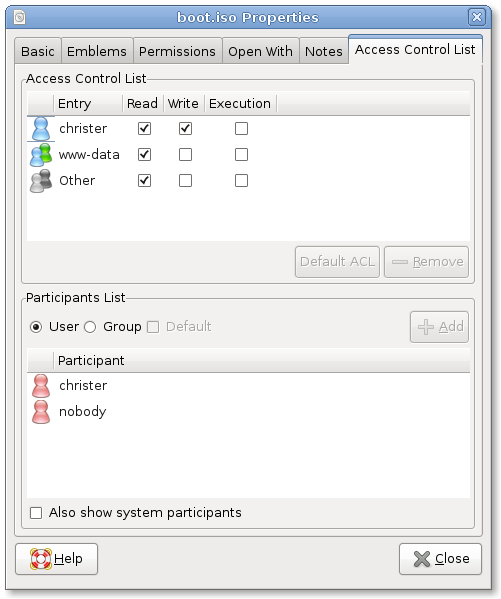
This will install an extension to the native “Properties” of a file (find this via right-click, Properties) which will let you add and update ACLs. note: You may not see this listed until you restart nautilus, which can be done using:
killall nautilus
Troubleshooting
If you find that this isn’t working for you you’ll need to ensure that your file system is mounted with ACL support. This can be done one of the following ways:
sudo mount -o remount,acl /filesystem
You can also update your /etc/fstab to include “defaults,acl” for the filesystem(s) that you want to be supported and then remount. Again, I’m assuming you know what ACLs are. A definition for ACLs may be for a later post.
It’s a real shame ACLs are not supported by default. They might not seem like a big deal for a home user but in conjuction with networked file shares in larger orgnisations they really are necessary…
That’s why it’s easy to install them though, for the enterprise editions.
Great find on this one, it’s one of those things you rarely think about, but if it was right there to use could be used all the time.
This is actually the sticking point for ACLs by default — no GUI to use them. There are several places where ACL is handy but we can’t go there because ACL is not on by default.
I think it would be in eiciel’s, Ubuntu’s and users in general best interests that eiciel got a serious project page. A bug tracker and announcement system are helpful in determining whether a project is suitable for mainlining. There’s only one open bug report in Launchpad, but I know I saw some poor sap in the forums mention recursive permission support.
Interesting post. This came up at work the other day as MS can do this natively and Linux cannot (I constantly defend linux being the only linux guy on a team filled with MCSE fan boys).
Is there a way to manage ACLs from the CLI?
@volksman – getfacl to view ACLs and setfacl to apply them. see the man page for more details.
NFS4-Support would be nice
Good for local use. (in a NFS4/Network-Enviroment eiciel states: “Operation not suppoerted”) so we still have to stay with commandlinetool /usr/bin/nfs4_editfacl (from nfs4-acl-tools), probably due a missing libacl-patch in Ubuntu.
http://www.citi.umich.edu/projects/nfsv4/linux/acl-patches/2.2.42-2/acl-2.2.42-CITI_NFS4_ALL-2.dif