There was some recent discussion on one of the local User Group lists this week about “What is your favorite underdog OSS application?” This discussion brought out quite a few of the little never-heard-of applications, yet many of them have proven to be really useful! If you’ve never spent an hour or two poking around the less-popular section of the repositories you’ll be surprised what you find in there!
Auto-Hide Your Mouse Pointer with Unclutter
The purpose of Unclutter is very simply. From the man page:
unclutter removes the cursor image from the screen so that it does not obstruct the area you are looking at after it has not moved for a given time.
Not anything too complicated about that. Now lets get it installed! Installation can be done by issuing the following command or clicking the link.
sudo aptitude install unclutter
Now that we have it installed the one last thing we’ll need to do is configure it and have it automagically start at boot time. We’ll do this by way of “System > Preferences > Sessions”
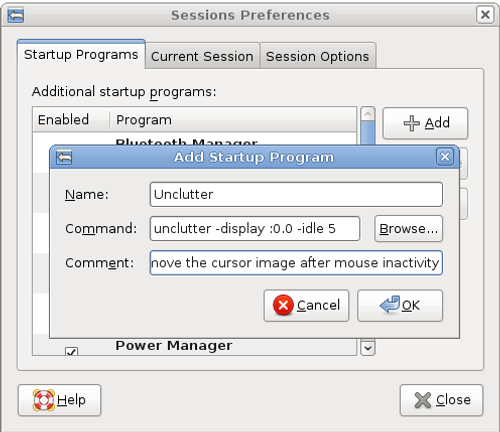
The “sessions” for your Desktop controls what applications and services are auto-started when you login. This way unclutter will start up automatically. You’ll want to click “Add” and populate the three fields. For name “Unclutter” should be fine. For the command field you’ll want something like:
unclutter -display :0.0 -idle 5
And you can populate the comment with whatever you like. I used “Remove the cursor image after mouse inactivity.”
You can find more options in the man page (man unclutter), but this should basically hide the mouse pointer after 5 seconds of inactivity on your default display.
Does the pointer always come back properly? I’ve never used this, but I know the pointer used to disappear while I was idle in Firefox, and then it’d refuse to come back. I started using Compiz’s water plugin to find it again.
Wow that was right what I was looking for. Always wondered if I could make the pointer disappear when typing like it was in Windows XP some years ago.
Just a nice option: -keystroke makes the pointer disappear only when you type something.
Thanks for that!
I’d like to use this in Xubuntu, but the Sessions thing in XFCE doesn’t have the Add feature.
Oops! I typed too soon. There’s a Settings gadget called “Autostarted Applications” that seems to do the job.
works perfectly, thanks a lot!
Little things that make me happy. Thanks for this. It works in all most windows (but not, for example, in this very dialog in Firefox as I’m typing :-\ But it mostly works and that’s an improvement.
Thanks for this wonderful entry – I was just looking for exactly this! Perfectly fits awesome as my window manager 🙂
Only needs “unclutter” as the command in all common cases, 5 is the default according to the man page.
Great little app!
Love this, thanks.
Perfect! I use Ubuntu for projector displays. Nice to not have the pointer in a conspicuous spot! 🙄
Thanks Christer.
The tutorials like this one are my first reason why I like Ubuntu and adore the community!
This is all good.
just remember to switch it off when using sdl apps (zsnes etc.) because it fscks up the pointer movement.. 😉