It was pointed out to me recently that the graphical tool for sharing files and folders no longer displayed within the Main Menu. I’m not sure if this is reported as a bug anywhere (I haven’t looked), but I thought I would mention how you can still use the tool, or even better, manually add it to your menu. This tutorial is for anyone that wants to simply share files and folders via samba or NFS.
Sharing Folders with Shares Admin
First, lets take a look at the shares-admin tool. It is a graphical management tool for sharing files and folders by way of NFS or samba. If you’re not familiar with these protocols, samba is generally used for sharing within a Windows network, and NFS for Linux/Unix networks.
To launch the shares-admin tool type:
ALT-F2: shares-admin
You’ll be asked to “Unlock” access for your user, and then you’ll be able to create a share.

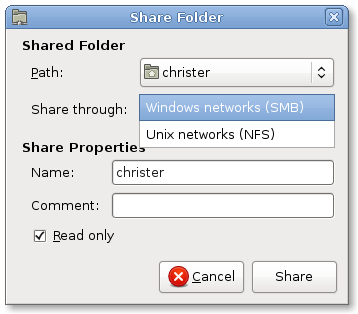
Click “Add” to create a new share. Select the folder you want to share, the protocol you want to share it with, and the name you want to give it. It’s that simple!
Adding Shares-Admin to your Main Menu
If this is something you find you might use often you may want to add it to your Main Menu. This can be done pretty easily, by using the Main Menu Editor. I posted about this recently, Edit The Main Menu with Two Clicks on Ubuntu 8.04.
I’m not sure if this is the reason for it’s removal but you can still share folders through nautilus by right clicking a folder and clicking “Share”. If I remember correctly this brings up the 2nd of those two dialogs with the folder already selected.
I still think it’s a useful tool to have in the Administration menu though, especially for summarising what you have shared.
Please don’t tell how to use this tool under Hardy ! It’s hidden because it’s unmaintained upstream and have security problem. It’s hidden to let people successfully upgrade from Gutsy.
You must use right-click under nautilus -> share (nautilus-share package)
Suppose you wanted to set-up a group of Ubuntu desktops to share a folder, would you need to install what(?) on each machine? Or is just one machine enough and the others connect through Nautilus?
Adding the share is the easy part. The hard part is letting anyone actually use it. What this does is create a username-and-password-protected share, and then you have to invoke mystical commands on the command line to set a working password for each user. Creating a public anonymous share is unreasonable hard in Ubuntu. 🙁
It was helpful. thanx a lot.
Does anyone know what the users tab of this does?
I have been looking all over for this simple process and all I want to say is thank you tons. It worked so well and it was just very logical. Best part no command line stuff.
Hi!
It’s a good post but i’ve a question.when i choose the the protocol i don’t see Windows Network (SMB), but only Unix Networks (NFS). What can i do?
tnx
Marco
Same problem for me…A real noob, but linux is hard!
@ Anto
I also have the same problem, and got no forum which talks about the solution
I also have the same problem as Marco, Anto, and Marchello.
you hav 2 install samba on ur systm….if u r using ubuntu try dis “sudo apt-get install samba smbfs”