Archive

Posts Tagged ‘koala’

Announcing the Release Candidate for Ubuntu 9.10

October 22nd, 2009 No comments

The Ubuntu team is pleased to announce the Release Candidate for Ubuntu 9.10 Desktop and Server editions, Ubuntu 9.10 Server for UEC and EC2, and the Ubuntu Netbook Remix. Codenamed “Karmic Koala”, 9.10 continues Ubuntu’s proud tradition of integrating the latest and greatest open source technologies into a high-quality, easy-to-use Linux distribution.

We consider this release candidate to be complete, stable, and suitable for
testing by any user.

Ubuntu 9.10 Desktop Edition improves on the work of 9.04 to get you going faster, with improved startup times and a streamlined boot experience.

Ubuntu 9.10 Server Edition integrates Ubuntu Enterprise Cloud setup in the installer and provides improvements to system security with AppArmor, including an AppArmor profile for libvirtd to further isolate virtual machines from the host system.

Ubuntu 9.10 Server for UEC and EC2 brings the power and stability of the Ubuntu Server Edition to cloud computing, whether you’re using Amazon EC2 or your own Ubuntu Enterprise Cloud.

The Ubuntu 9.10 family of variants, Kubuntu, Xubuntu, Edubuntu, Ubuntu Studio, and Mythbuntu, also reach RC status today. This release sees the first technology preview of Kubuntu Netbook.

The final release of Ubuntu 9.10 is scheduled for 29 October 2009 and will be supported for 18 months on both desktops and servers. Users requiring a longer support lifetime on the server may choose to continue using Ubuntu 8.04 LTS, with security support until 2013, rather than upgrade to 9.10.

Before installing or upgrading to Ubuntu 9.10 please review the instructions and caveats in the release notes:

http://www.ubuntu.com/getubuntu/releasenotes/910

In addition, there are a small number of known bugs in the release candidate that will be fixed before the Ubuntu 9.10 release, but warrant highlighting for your attention:

http://www.ubuntu.com/getubuntu/releasenotes/910overview#Known%20issues

About The Release Candidate
—————————

The purpose of the Release Candidate is to solicit one last round of testing before the final release. Here are ways that you can help:

* Upgrade from Ubuntu 9.04 to the Release Candidate by following the instructions in the release notes referenced above.

* Participate in installation testing using the Release Candidate CD images, by following the testing and reporting instructions at
http://wiki.ubuntu.com/Testing/ISO

Desktop features
—————-

GNOME 2.28 featuring Empathy: with this latest release, Ubuntu now uses the Empathy instant messaging service by default, introducing the Telepathy framework.

Ubuntu Software Center: the first step in a replacement for Add/Remove Software has landed.

New boot experience: multiple changes to look, feel and speed of the boot experience have been included in the Ubuntu 9.10 release candidate.

Server features
—————

Cloud computing: Ubuntu 9.10 builds on the tantalizing cloud support in Ubuntu 9.04, with support for Eucalyptus configuration at install time and publishing of standard VM images for UEC.

AppArmor: Ubuntu 9.10 continues to raise the bar for server security, with AppArmor profiles enabled by default for ntpd and libvirt providing another layer of protection from attacks on the network or via guest virtual machines.

UEC and EC2: Ubuntu 9.10 includes the first official release of Ubuntu Server images for UEC and for Amazon’s EC2, giving you everything you need for rapid deployment of Ubuntu instances in a cloud computing environment. UEC images, and information on running Ubuntu 9.10 on EC2, are available at:

http://uec-images.ubuntu.com/releases/9.10/rc

Ubuntu Netbook Remix features
—————————–
Ubuntu Netbook Remix is optimised for Intel Atom netbooks and compatible x86 devices. It includes a new consumer-friendly interface that allows users to quickly and easily get on-line and use their favourite applications. This interface is optimised for a retail sales environment.

It includes the same faster boot times and improved boot experience as Ubuntu desktop.

Kubuntu features
—————-

Kubuntu 9.10, built on KDE 4.3, brings users a complete, full-featured KDE 4 desktop with many new applications and innovations.

This is the first release for a new Kubuntu variant, Kubuntu Netbook Edition. Built on a Kubuntu base, it brings users an exciting first look at KDE’s netbook-oriented desktop environment.

New features include better integration with OpenOffice.org and various social website connections for applications. Notable problems with network management and user configuration have been fixed.

Please see https://wiki.kubuntu.org/KarmicKoala/RC/Kubuntu for all the details.

For upgrade instructions from Kubuntu 9.04 or 8.04 see
https://help.ubuntu.com/community/KarmicUpgrades/Kubuntu

Xubuntu features
—————-

Xubuntu 9.10 comes with the light-weight Xfce 4.6 desktop environment to provide a desktop designed for productivity while conserving system resources.

Xubuntu 9.10 is proud to offer an improved multimedia experience with the Exaile media player, a more integrated power management solution with the Xfce4 power manager, and more convenience built right in with improved multimedia volume key support and more consistent desktop notifications.

Please see https://wiki.ubuntu.com/Xubuntu/KarmicKoala/RC for the full list and details about all the great enhancements Xubuntu 9.10 has to offer.

Edubuntu features
—————–

Edubuntu 9.10 transitions from an add-on educational CD that depended on an existing Ubuntu installation to a full Ubuntu derivative delivered on as a DVD image. This allows prospective users and decision makers to try the educational offerings prior to installation and the flexibility to make Edubuntu a first class educational operating system.

Mythbuntu features
——————

Mythbuntu 9.10 introduces MythTV 0.22. The entire stack has been ported to QT4 and now allows for very neat UI effects. Also 0.22 adds support for VDPAU hardware acceleration, and HD-PVR hardware support.

Please see http://www.mythtv.org/wiki/Release_Notes_-_0.22 for more details about changes introduced in 0.22.

See http://mythbuntu.org/9.10/rc for information about the Mythbuntu release candidate.

A more complete tour of the features new in 9.10 can be found at
http://www.ubuntu.com/getubuntu/releasenotes/910overview

About Ubuntu
————

Ubuntu is a full-featured Linux distribution for desktops, laptops, netbooks and servers, with a fast and easy installation and regular releases. A tightly-integrated selection of excellent applications is included, and an incredible variety of add-on software is just a few clicks away.

Professional services including support are available from Canonical and hundreds of other companies around the world. For more information about support, visit http://www.ubuntu.com/support

To Get the Ubuntu 9.10 Release Candidate
—————————————-

To upgrade to Ubuntu 9.10 Release Candidate from Ubuntu 9.04, follow these instructions:

https://help.ubuntu.com/community/KarmicUpgrades

Or, to perform a new installation or try out 9.10 “live” from CD, download the Ubuntu 9.10 Release Candidate here (choose the mirror closest to you):

Asia:

* http://mirror.unej.ac.id/ubuntu-cd/9.10 (Indonesia)
* http://ubuntu.qualitynet.net/releases/9.10 (Kuwait)
* http://ftp.linux.org.tr/ubuntu-releases/9.10 (Turkey)

Europe:

* http://ubuntu.ipacct.com/releases/9.10 (Bulgaria)
* http://ucho.ignum.cz/ubuntu-releases/9.10 (Czechia)
* http://ubuntu.univ-nantes.fr/ubuntu-cd/9.10 (France)
* http://ftp.uni-kl.de/pub/linux/ubuntu.iso/9.10 (Germany)
* http://ie.releases.ubuntu.com/9.10 (Ireland)
* http://releases.ubuntu.fastbull.org/ubuntu-releases/9.10 (Italy)
* http://no.releases.ubuntu.com/9.10 (Norway)
* http://se.releases.ubuntu.com/9.10 (Sweden)

North America:

* http://mirror.anl.gov/pub/ubuntu-iso/CDs/9.10 (United States)
* http://mirror.csclub.uwaterloo.ca/ubuntu-releases/9.10 (Canada)
* http://mirrors.cat.pdx.edu/ubuntu-releases/9.10 (United States)
* http://ubuntu.media.mit.edu/ubuntu-releases/9.10 (United States)

Oceania/Australia:

* http://ftp.citylink.co.nz/ubuntu-releases/9.10 (New Zealand)

South America:

* http://mirrors.ucr.ac.cr/ubuntu-cd/9.10 (Costa Rica)

Rest of the world:

http://releases.ubuntu.com/9.10 (Great Britain)

Please download using Bittorrent if possible. See https://help.ubuntu.com/community/BitTorrent for more information about using BitTorrent.

Feedback and Participation
————————–

If you would like to help shape Ubuntu, take a look at the list of ways you can participate at

http://www.ubuntu.com/community/participate/

Your comments, bug reports, patches and suggestions will help turn this Release Candidate into the best release of Ubuntu ever. Please note that, where possible, we prefer that bugs be reported using the tools provided, rather than by visiting Launchpad directly. Instructions can be found at

https://help.ubuntu.com/community/ReportingBugs

If you have a question, or if you think you may have found a bug but are not sure, first try asking on the #ubuntu IRC channel on FreeNode, on the Ubuntu Users mailing list, or on the Ubuntu forums:

http://lists.ubuntu.com/mailman/listinfo/ubuntu-users
http://www.ubuntuforums.org/

More Information
—————-

You can find out more about Ubuntu and about this preview release on our website, IRC channel and wiki. If you are new to Ubuntu, please visit:

http://www.ubuntu.com/

To sign up for future Ubuntu announcements, please subscribe to Ubuntu’s very low volume announcement list at:

http://lists.ubuntu.com/mailman/listinfo/ubuntu-announce

Categories: Ubuntu Tags: , , , , ,

Ubuntu 9.10 “Karmic Koala” Beta Reviewed (Screenshots!)

October 2nd, 2009 15 comments

Yesterday I installed the Ubuntu 9.10 “Karmic Koala” Beta release by way of the desktop (Live-CD) based installer. The installation was very clean and polished. It has been a while since I’ve used a graphical installer and I am pleased with the improvements that I found. It definitely rivals any “professional” or “enterprise” install session that I’ve ever seen, and easily beats them in terms of speed and ease. I’d like to give a short review of the Beta release and encourage everyone to try it and finalize any remaining bugs.

Installation

The installation was quick and painless. All of the questions were asked in the beginning and then the installer took over. During the installation messages were displayed regarding the benefits of Ubuntu and the software that it provided. Below are some screenshots of the installation process.

ubuntu-beta-install-1

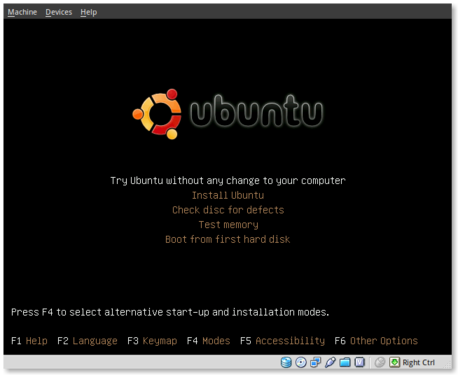
This is the initial installation screen. As you can see it offers a number of options including disk and memory checks, as well as booting off existing installations. I selected “Install Ubuntu” and hit [ENTER].

ubuntu-beta-install-2

This appears to be the initial boot splash screen while the Live-CD installer is booting.

ubuntu-beta-install-3

A preview of the new default wallpaper.

ubuntu-beta-install-4

Welcome to the installer! Select your preferred language. This language will be used during and after the installation.

ubuntu-beta-install-5

Select your timezone. I very much like this improved location selector tool. Instead of trying to find myself on a map that zooms in and out (you may remember what I’m referring to from previous releases), this simply slices up the world into timezones and allows you to select yours.

ubuntu-beta-install-6

Select your keyboard layout. For US English standard qwerty layouts you can click forward. I needed to select “Choose your own:” and “USA – Dvorak” for my layout.

ubuntu-beta-install-7

Partitioning was simple. I erased and used the entire disk.

ubuntu-beta-install-8

Username information. Enter your full name, username and password information. Remember that this user will also act as the initial administrator.

I also like the addition of the “Require my password to log in and to decrypt my home folder” as well as the other options. I selected the last option and am using the encrypted home folder system.

ubuntu-beta-install-9

Final review point before installation. From here you can still go back and make changes. Once you click install it should be hands free from here out.

ubuntu-beta-install-10

Welcome to Ubuntu 9.10 – “Ubuntu is designed to be easy. Feel free to explore!”

ubuntu-beta-install-11

Browse the web with Firefox

ubuntu-beta-install-12

Relive Memories with F-Spot Photo Manager

ubuntu-beta-install-13

Accessibility in Ubuntu

ubuntu-beta-install-14

Control your digital life with Evolution

ubuntu-beta-install-15

Keep in contact with Empathy IM

ubuntu-beta-install-16

Office tools at your fingertips

ubuntu-beta-install-17

Watch and listen on Ubuntu

ubuntu-beta-install-18

Installing additional software

ubuntu-beta-install-19

Getting Help with Ubuntu

ubuntu-beta-install-21

Post Installation

Installation complete. At this point you can restart the machine and your installation should be done.

after-installation

This is a screenshot of my final installation. I have changed the following:

Conclusion

So far I think this release seems very polished. The graphics and artwork are very clean and professional. I had no trouble getting things installed properly, and I haven’t had any issues post-installation. The notification system appears to be a little more polished as compared to 9.04. We’ll see what my feelings are with continued use.

So far I am pleased with this release and would confidently suggest it to others, even if it is the Beta release.

Bugs

I did submit two bugs since I installed. I’ve listed them below for feedback, verification and hopefully closure:

Ubuntu 9.10 “Karmic Koala” Alpha 5 Reviewed

September 7th, 2009 5 comments

I very briefly tried out the fifth alpha release of Ubuntu 9.10 “Karmic Koala” tonite and I thought I would share some of my immediate impressions with the rest of you. To sum it up, I hope others are having better luck with it than I did.

System

The machine that I installed on is a Dell Latitude D630. That is a Core 2 Duo 2.10GHz, 2G RAM, 80G HDD, Integrated Intel video and Intel 3945ABG wireless adapter. It is pretty standard hardware as far as I’m concerned–the intel hardware is all supported just fine.

Negatives

I installed using the alpha 5 alternate installer (text based). I used LVM + encryption for my partitioning and otherwise used all default settings, but my problems started before the installer was even finished. Actually, I don’t know if I can accurately say that because the installer never actually did finish. It got to the point of adding the user(s) and then hung. I finally decided to reboot the machine and see what state it was in.. maybe it could be salvaged. Luckily it seemed to be in working bootable order. at least at first glance..

Some of you may remember that I’m a dvorak user. Most of the time this doesn’t cause any problems as I’m the only user on my machine and I can configure the keyboard anyway I’d like. There are those few exceptions however where it ends up causing issues. This was one of them.

When I tried logging into my new installation I noticed the keyboard settings weren’t in place. It was still trying to use qwerty, even though I had used dvorak throughout the installation. I tried setting it manually, which worked during my session, but didn’t persist. I even tried reinstalling the console-setup package to alter the system-wide keyboard. That didn’t seem to take effect either.

I noticed some other oddities as well, most of them linked back to the keyboard layout issue.

Positives

On the positive side I was very impressed with the improved boot time and splash screen. I didn’t time the boot, but I want to say the speed was improved. The graphics were also a bit cleaned up. Ohh, and the horrible GDM graphic from 9.04 was gone as well!

I was also glad to see that ext4 is the new default filesystem. I’ve been running ext4 since it become “stable” and I’ve had no problems with it at all. It is *much* faster than ext3 as well as most of the other common file systems.

The addition of GRUB2 will be very interesting I’m sure. I didn’t get to play with it much, but I’m glad to see that is finally being used. I understand there are a lot of technical improvements in GRUB2 vs the traditional “legacy” GRUB.

I also noticed that some of the issues I’ve had in the past with Intel video were gone. This is due to the replacement of EXA with UXA. For any of you Intel users, this is a big one to be excited about, particularly if you have issues currently on Ubuntu 9.04.

Conclusion

In conclusion I think there are going to be a lot of very noticeable improvements in Ubuntu 9.10 and I’ll be happy to use it. Based on my keyboard issues however it will be hard for me to use at this point. I’ve gone back to Ubuntu 9.04 for the meantime. Perhaps I’ll try it again when it hits Beta.

What regressions or improvements have you found with Ubuntu 9.10 releases? Are you excited to see it coming or are you going to be reluctant to upgrade? I’d really like to hear that other people are having better luck than I did. Chances are, considering my problems were dvorak related, you probably did.

Categories: Ubuntu, Upgrade Tags: , , , , , ,

Ubuntu 9.10 “Karmic Koala” Alpha 2 Released

June 12th, 2009 1 comment

For those of you that enjoy the bleeding edge and want to help test the next release of Ubuntu, the second Alpha release of 9.10 is now available. You should be warned that this release is not meant for the faint of heart or production machines. It will very likely break before it is done, leaving you with all kinds of interesting problems. On the other hand though, a little bleeding edge never killed anyone (plus, you learn a lot when things break).

Some of the upcoming features in Ubuntu 9.10 are:

  • GNOME 2.27.1
  • Linux Kernel 2.6.30
  • New Intel Video Architecture (testing)
  • New default compiler (GCC-4.4 vs GCC-4.3)
  • EXT4 filesystem by default (I’m excited about this one!)
  • Grub2 by default

If you’d like to help test this release you can find more information regarding known issues, download locations and how to report bugs here. Let the testing begin!

Categories: Testing Tags: , , ,