I just came across a method to consolidate your three gnome menus (applications, places and system) into one. For those of you that have used SLED (SuSE Linux Enterprise Edition) or openSuse 10.2 you’ll recognize this layout. It turns out it is also an option for our Ubuntu machines.
To install the new menu layout simply install the following with your favorite package management interface.
sudo aptitude install gnome-main-menu
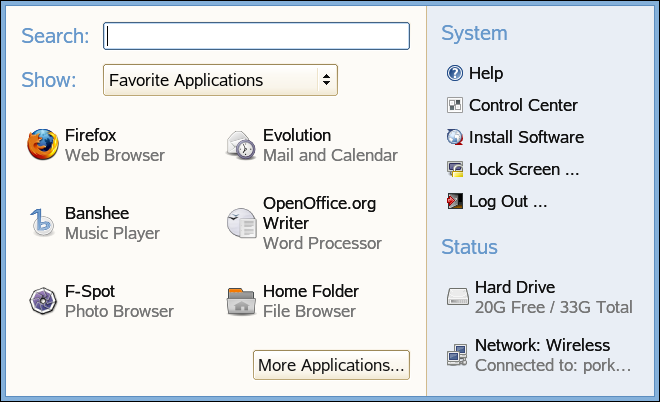
Once you’ve installed the package you’ll need to simply add it to your panel. You do that via a right-click on your current menu panel and add the new “gnome main menu” under the utilities section. (note: there are two listings for the main menu at this point in the “add to panel” dialog. You’ll want to add the one that looks like the computer icon and not the ubuntu logo.)
As you can see this menu layout combines all of your options into a central layout. You’ve got your favorite, or most commonly used, applications listed by default and the system options on the right. The drop-down menu will show you recent documents and places.
What I have done at this point is removed my previous menu (via right-click, remove from panel) and replaced it with this new layout. You may need to use the right-click and move option to put the new listing in the right place.
update: if you want to revert your changes and replace the original menu simply re-add the other gnome-main-menu.. the one that looks like the ubuntu logo.
Now, if i could only bind a shortcut to it _without_ adding it to the panel. It’s not possible to do that even when i’ve added it to the panel. That would be great…
Pingback: paulmellors.net » Ubuntu - The Slab
Ah, but is there a way to make Alt-F1 open this menu instead of the old one?
Ahem, I hate to sound like an ex-XP fanboy here… but…
I have tried this menu once before, and found myself switching back to the good old default 3 menus quickly. The reason for this, I found this menu too ineffecient to use. it can show your most popular apps – good – allthough you have to build this list manually, unlike XP. But what if you want to run another program you don’t use very frequently – You have to click on “More Applications” first, then find the application in a huge list, and do another click to launch it – that’s lot more clicks than XP’s start panel. I think it would be much better if there was an “All Programs” item like XP down the bottom of the menu, that would collapse your standard looking “Applications” menu.
I have tried a similar menu called “Ubuntu System Panel”. However, the problem with this panel, it was too wide (3 columns), and too complex at first glance, and once again, lacked some elements to actually make it effecient to use.
I’ve always thought XP’s start panel has had a lot of effort put into effecient design. For a good start panel, you need (in my mind): automatically generated most frequently used apps (or manual, you should be able to choose), your places should be easily accessible (not as a sub menu, but rather straight on the panel), system icons should be easily accessible, and a hover-over menu that quickly opens “all programs”. And it should only be 2 columns wide, 3 columns just looks too much.
There was one point, I was thinking of doing a “mockup” in Gimp and putting it on the Ubuntu forums. I might still do that one day.
No, I’m not that much of an XP fanboy, in fact, I use Ubuntu for my day to day use, I do however think that XP’s start panel is well designed.
This rocks!
Ubuntu default, anyone?
That is the balls.
Many thanks for posting that, I would never have heard of it otherwise.
Only just started using it, so I can’t comment on how I’ll find it’s effectiveness in the longterm, but at the moment it seems to function quickly enough for my needs, although having to open a new window to see all my applications is potentially a little frustrating.
Yeah it’s great, apart from the fact that favorite applications fall off the list mysteriously, the more applications design requires clicking and so makes it more frustrating to get to other apps, the recent documents and places selector is again more clicking and more hassle.
I tend to agree that the XP one is a better design (though I hate XP) but I find it annoying with XP that apps are added automatically when you use them once (and may never use them again).
I like it, but how would one go about editing its appearance? Specifically, making it use only the icon on the panel, without the label.
It’s also interesting that users on the Xubuntu wiki are floating requests to do the opposite – to move from one menu to three.
To add applications to the “favorites” you can take a look at this: http://reverendted.wordpress.com/2006/06/18/customizing-the-gnome-main-menu/
Pingback: Bitelia » Compactando los menús de Gnome en Ubuntu Feisty
Pingback: /dev/random » Blog Archive » links for 2007-02-01
Pingback: Une goutte de blog » Archive du blog » Un nouveau menu avec gnome-main-menu
Pingback: Une goutte de blog | Un nouveau menu avec gnome-main-menu
I really like the font you are using, what is it?
Unfortunately I don't know what that font is/was. This post was published nearly three years ago, so I don't recall. My favorite fonts are ttf-droid and ttf-liberation. You might try those to match the look.
The Slab Menu has many many many defects, my dear mouse-clicker,…
In the firt place it is slower to do things with it than with the comon menus in gnome. Not only to find things but to find out things, understand, learn,…. It is closed.
It has a lot of wasted empty space and that’s why it is so BIGGG.
If you want to find what’s the real name of an application (which is usual ecause they never use the real name) in the menus, you need to drag the icon to the desktop, right-click on the new icon, go to properties, close and then move the new icon to the tray… UUHH!!
Why are the games at the top of the list if they are what I use less??…UHHH?
Why are there so many instances of the same application. That akes it dificult to find them… and why are they so stupidly classified?? UHH!!
Why are there recent applications, recent documents but no recent places??
Whay can’t I choose how many recent applications, places and documents I want to have?
Why isn’t there a button to edit it, erase the recent items, and lock it?? THAT’S THE FIRST LESSON YOU LEARN when ou learn how to build an application!
Add, modify and Delete,
Add, modify and Delete,
Add, modify and Delete;
Add, modify and Delete,……
And last, but not least, the lists of recent items and the lists of favurite items should be SCROLLABLE!!!
Bye bye!
The Slab Menu has many many many defects, my dear mouse-clicker,…
In the firt place it is slower to do things with it than with the comon menus in gnome. Not only to find things but to find out things, understand, learn,…. It is closed.
It has a lot of wasted empty space and that’s why it is so BIGGG.
If you want to find what’s the real name of an application (which is usual ecause they never use the real name) in the menus, you need to drag the icon to the desktop, right-click on the new icon, go to properties, close and then move the new icon to the tray… UUHH!!
Why are the games at the top of the list if they are what I use less??…UHHH?
Why are there so many instances of the same application. That akes it dificult to find them… and why are they so stupidly classified?? UHH!!
Why are there recent applications, recent documents but no recent places??
Whay can’t I choose how many recent applications, places and documents I want to have?
Why isn’t there a button to edit it, erase the recent items, and lock it?? THAT’S THE FIRST LESSON YOU LEARN when ou learn how to build an application!
Add, modify and Delete,
Add, modify and Delete,
Add, modify and Delete;
Add, modify and Delete,……
And last, but not least, the lists of recent items and the lists of favurite items should be SCROLLABLE!!!
Bye bye!