update: I realize the formatting for this post is a bit screwed up. If anyone has any tips on fixing it I’d appreciate it. It looks fine in the editor view, but when I publish it everything gets screwy.
Today’s tip is a Gnome Desktop tweak that may be new to some of you. Did you know you can activate a weather applet as part of your desktop clock? You can also add locations around the globe, which can be a great way to keep track of day and night for all of your international buddies :).
Activating the Weather Applet
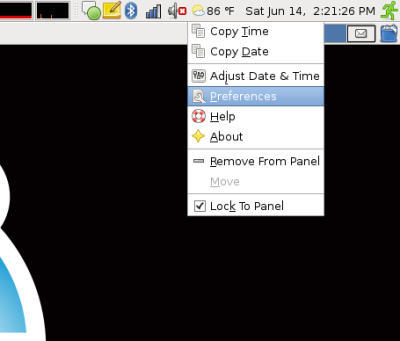
To activate the Weather Applet right-click on the desktop clock in the top-right of your screen and select “Preferences”.
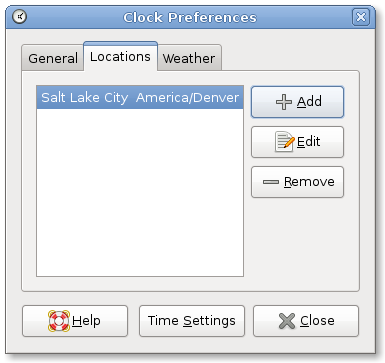
Select the “Locations” tab, and “Add” a location.
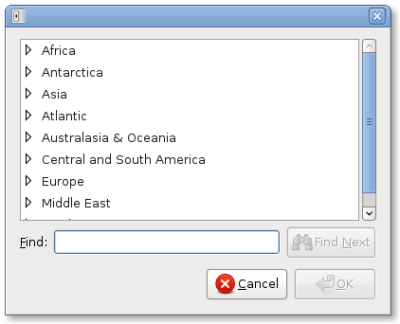
You’ll need to find your location around the globe within the list.
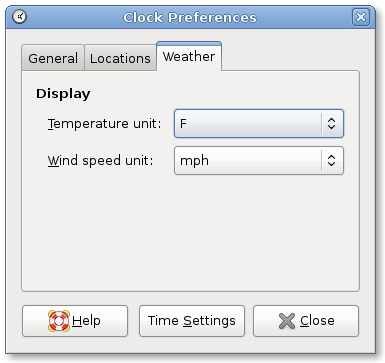
Once you’ve selected your location you can also change your weather preferences on the “Weather” tab.
Now you can enjoy weather at a glance, or quickly see the time around the globe for multiple locations!
Hi, with regard to the layout, it is because your css is making your images float:left. The property is under the class contentmiddle p img and content p img. Good tutorial though, as usual.
Is there a plan to add weather maps to the applet?
I really enjoy having the weather information linked to the clock. However, I wish there was a way to get an extended forcast, much like the standalone weather panel applet.
In response to the layout: Yes, this is due to the “float” attribute in your template. If you want to disable float on individual images, you can add style=”float: none;” to the tag. Or, you can add style=”clear: left” to subsequent items to force them to appear under your images.
Don’t forget to file a bug with WordPress regarding the issue. Just because you have sharp readers who can help, not everyone who experiences this does.
Another weather applet I enjoy is Weather Wallpaper from http://mundogeek.net/weather-wallpaper to replace your desktop background with the current weather. There are times it doesn’t refresh properly, but overall it is pretty nice.
There’s also the Forecast Fox plugin for Firefox, which does what the other comments have requested. You can have current radar and extended forecasts as well as severe weather alerts.
Hi,
On intrepid, I can’t find the list of locations so I got no weather working.
Any ideas why that is? Is that list an Ubuntu patch, or is that a regression upstream?
@Matt – It took me a while to catch this one also. Start typing your location and it’ll auto-fill. I would have never guessed that–I think the previous location list was more intuitive.
what is the program that does this? I was running ubuntu, but switched to Debian… and I can’t find the app that is behind this feature.
My weather seems to work fine, except for the "icon" itself. It always the sunny one (and moon). No rain, no clouds. And I'm in Montreal, QC, Canada and I know for sure that CYUL report sky conditions. So why I can't have it there ?
TIA!
You can get more detailed weather by right-clicking on the panel (not on the clock) and click "Add to Panel". In there is "Weather Report" near the bottom, and this allows for getting much more detailed weather with forcast, and even a radar map. This also allows for more locations, where the clock weather didn't get weather for my location. You'll need to right-click on the icon first and set the preferences for the location, ect. I am running Ubuntu Jaunty Jackalope (9.04).
Is there a possibility to set more locations?
You should be able to add multiple locations, yes. I'm not at my Ubuntu machine at the moment, but I recall adding locations for friends around the world so I could at-a-glance tell roughly what time it was in their area.
hi i was wondering if there was a way to add more citys or to select a different provider to get the information from as it only lists 3 citys from New Zealand and im not near any of them?
I agree with Rob – I want to add Galway (Ireland) to mine.
right click on bottom panel in pop up menu click add to panel type weather report or scroll down to find highlight by single click then click add close add to panel window there will be a moon and 0 F right click this on pop up click preferences set for your location hope this helps
my location is not on the list
how do I add it?