Recently I was tasked with doing a bunch of documentation work here at the office, and I decided to put together a wiki for the job. After a few hours of editing directly into the browser I was about to blow my brains out. I quickly decided that if I’m going to be working with a lot of text I need a real editor, like vim.
I set out to find some solutions and quickly ran into a Firefox addon that allows you to edit most forms, including wiki pages, with your editor of choice.
You can install the addon directly from Mozilla or you can get it from the Ubuntu repository. Links for each below:
sudo aptitude install itsalltext
Once you have it installed you’ll need to, of course, restart the browser and then you can configure it. You can configure it via Tools > It’s All Text > Preferences, or from within your Addons Management Window.
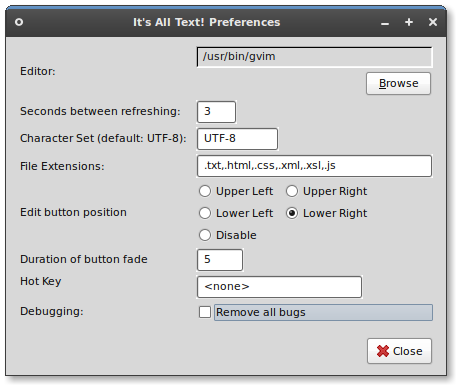
As you see here my prefered editor is gvim, which I can select using the “Browse” button. Note: if you don’t have gvim installed you’ll want to add the vim-full package:
sudo aptitude install vim-full
Now that you have this configured you can simply edit most forms on the web by right-clicking within the form and selecting “It’s All Text”, or by clicking the “Edit” button that you’ll now see to the lower right (based on my configuration) of the input field.
For all of you that spend hours and hours editing wikis and other online forms I hope this helps out. I know it saved me from wanting to throw myself out the window!
Great tip Chris. Thanks!
I love It’s All Text. Wiki editing was my primary reason for starting to use it too, but it’s been great for web mail too when I want a fixed width mail to go out. I use vim, launched in a terminal, so:
elizabeth@r2d2:~$ cat bin/its-all-text-editor
#!/bin/bash
exec xterm -fg white -bg black -cr magenta -fn 9×15 -e vim -X “$@”
Pure awesomeness 🙂
view source with is another https://addons.mozilla.org/en-US/firefox/addon/394
The lack of proper focus when returning from vim always bugged me with It’s All Text. The cursor was never back in the texbox.
Mozex is another great one for doing this (and a whole lot more):
https://addons.mozilla.org/en-US/firefox/addon/40
Well, since you also use gvim in that example, i can recommend Vimperator (vimperator.org), which not only allows external editor editing (with ctrl-i), but make Firefox much more vim like.